
Increase the Power of MaintainX
Automated MaintainX Data Integration for Asset-Centric Financial Visibility
Seamlessly connect your MaintainX maintenance and asset data to Sage Intacct through a secure, automated integration that transforms operational activity into accurate, accounting-ready financial records.
Integration Overview
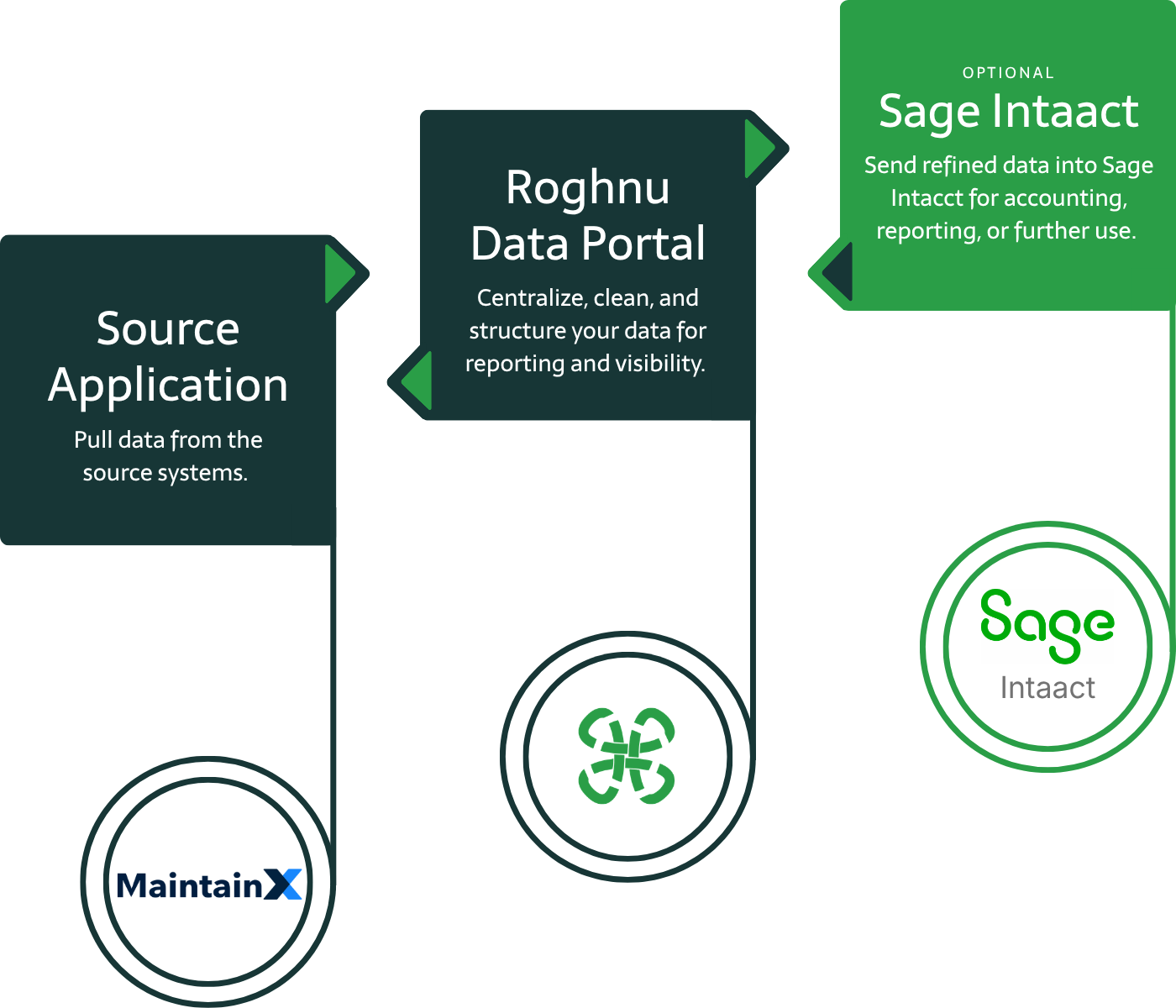
MaintainX data is extracted securely via API
Maintenance activity, labor, parts, and asset data are transformed into accounting-ready formats and posted directly into Sage Intacct
No manual exports or spreadsheet-based processes
Scheduled automated data ingestion
MaintainX Integration with the Roghnu Data Portal & Sage Intacct
The MaintainX to Sage Intacct integration connects your maintenance and asset management data directly to your financial system through a secure, API-based pipeline. Work orders, labor, parts, and asset activity are extracted from MaintainX, transformed into accounting-ready formats, and posted into Sage Intacct. This ensures accurate cost tracking, improved visibility into asset performance, and alignment between operational activity and financial reporting.
Who Uses the Roghnu maintainx Integration
Finance Teams
Accurate, automated cost tracking for maintenance, assets, and financial reporting..
Executive Leadership
Clear visibility into asset performance, operational spend, and financial impact.
Operations Leaders
Direct insight into work orders, labor, parts, and asset-related costs across locations.
Benefits of the MaintainX Integration
-

Eliminate Manual Journal Entries
Automatically sync maintenance activity, labor, and parts from MaintainX into Sage Intacct. No spreadsheets or manual posting.
-

Accurate Maintenance Cost Tracking
Capture and allocate maintenance costs at the asset, location, or project level for precise financial reporting.
-

Asset-Level Financial Visibility
Tie maintenance activity directly to assets to understand lifecycle costs, performance, and long-term value.
-

Faster Close & Easier Reconciliation
Standardized, automated postings reduce discrepancies and streamline month-end close.
-

Stronger Financial Controls & Auditability
Consistent transformation logic and API-based integration improve traceability and support audit readiness.
-

Scales With Your Business
Supports growing asset bases, maintenance volume, and organizational complexity without increasing manual effort.
What is the Roghnu Data Portal?
The Roghnu Data Portal is a secure cloud-based data warehouse designed to centralize business data from systems like HR, payroll, finance, and operations into the Roghnu Data Portal where it becomes available for:
enterprise reporting
workforce analytics
financial reporting
executive dashboards
data integrations across business systems
The platform acts as a single source of truth for organizational data, allowing teams to build reports and dashboards using the most accurate and current information available.
The Roghnu Data Portal brings all your business data together, giving you clarity and speed to lead with confidence.
Why Choose Roghnu
A Smarter Way to Connect Data, Decisions, and Growth
Business leaders choose Roghnu because it transforms fragmented data and manual processes into a single, powerful source of insight.
Secure Data Vault Architecture

Enterprise Data Management

Unified Reporting Capabilities
Sage Intacct Partner & Expertise

Platform Scales With You

Beyond maintainx, We Also Have Integrations for:



Frequently Asked Questions
maintainx to Roghnu Data Warehouse and Sage Intacct FAQs
-
The integration can include sales transactions, payments, refunds/returns, products and inventory, customers (optional), locations, and operational datasets. Data is structured and transformed based on your accounting and reporting requirements, defined during implementation.
-
Roghnu uses secure API-based connections to extract data from MaintainX, apply accounting-specific transformations, and automatically post it into Sage Intacct. Maintenance activity, labor, and asset-related costs are aligned with your chart of accounts, dimensions, and financial structure.
-
Most clients use automated daily processing, but the schedule can be configured based on your operational and financial reporting needs. The integration ensures maintenance and cost data stays current and consistent.
-
Yes. The integration is designed to translate maintenance activity into accurate financial records, supporting cost tracking, asset-level reporting, capitalization, and expense allocation within Sage Intacct.
-
Yes. All data transfers use encrypted, API-based connections. Roghnu follows strict security and access control standards to ensure your operational and financial data remains protected.
-
No. Roghnu manages the ongoing maintenance, monitoring, and updates for the integration. Your team can focus on using the data rather than managing the underlying data pipeline.
maintenance Data Available via maintainx Integration
Work Orders
Labor Entries
Parts & Materials Used
Asset Categories
Locations/Facilities
PM Schedules
Vendors & Purchases
Additional fields are configurable based on individual integration requirements.