
Increase the Power of Lightspeed
Automated Lightspeed POS Data Integration for Accurate Financial Reporting and Scalable Operations
Seamlessly connect your Lightspeed POS data to Sage Intacct through a secure, automated integration that transforms transactional data into clean, accounting-ready financials.
Integration Overview
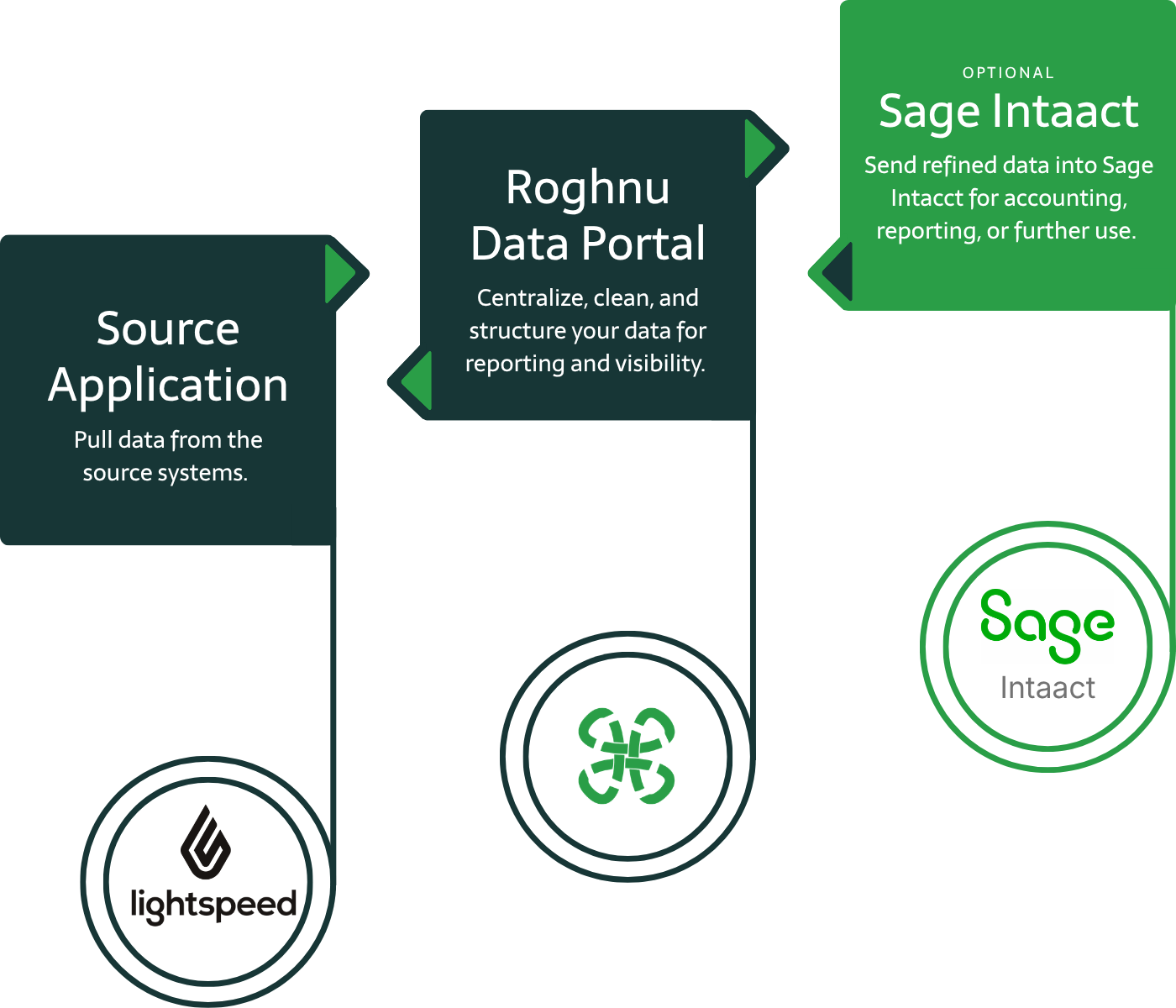
Lightspeed data is extracted securely via API
Data is transformed and posted directly to Sage Intacct
No manual exports or spreadsheet-based processes
Scheduled automated data ingestion
Lightspeed Integration with the Roghnu Data Portal & Sage Intacct
The Lightspeed POS to Sage Intacct integration connects your point-of-sale data directly to your financial system through a secure, automated pipeline. Transactional and operational data is extracted from Lightspeed, transformed into accounting-ready formats, and posted into Sage Intacct with full detail and accuracy, eliminating manual work while improving reporting and financial visibility.
Who Uses the Roghnu lightspeed Integration
Finance Teams
Accounting-ready data for faster close and reconciliation.
Executive Leadership
Real-time financial visibility for confident decision-making.
Operations Leaders
Standard data across locations, products, and channels.
Benefits of the Lightspeed Integration
-

Eliminate Manual Data Work
Automatically extract and post Lightspeed transactions into Sage Intacct. No manual exports, spreadsheets, or rekeying.
-

Accounting Ready Data
Transactions are transformed and aligned to your chart of accounts and dimensions, ensuring clean, accurate financials from the start
-

Faster Close & Easier Reconciliation
Standardized data and automated posting reduce discrepancies and speed up month-end close and financial review.
-

Improved Financial Visibility
Access timely, reliable insights into revenue, payments, refunds, and performance across locations and channels.
-

Secure Reliable Data Flow
API-based integration with built-in monitoring ensures consistent, accurate data delivery without fragile file-based processes.
-

Scales With Your Business
Supports growing transaction volume, additional locations, and evolving reporting needs without increasing accounting complexity.
What is the Roghnu Data Portal?
The Roghnu Data Portal is a secure cloud-based data warehouse designed to centralize business data from systems like HR, payroll, finance, and operations into the Roghnu Data Portal where it becomes available for:
enterprise reporting
workforce analytics
financial reporting
executive dashboards
data integrations across business systems
The platform acts as a single source of truth for organizational data, allowing teams to build reports and dashboards using the most accurate and current information available.
The Roghnu Data Portal brings all your business data together, giving you clarity and speed to lead with confidence.
Why Choose Roghnu
A Smarter Way to Connect Data, Decisions, and Growth
Business leaders choose Roghnu because it transforms fragmented data and manual processes into a single, powerful source of insight.
Secure Data Vault Architecture

Enterprise Data Management

Unified Reporting Capabilities
Sage Intacct Partner & Expertise

Platform Scales With You

Beyond lightspeed, We Also Have Integrations for:



Frequently Asked Questions
lightspeed to Roghnu Data Warehouse and Sage Intacct FAQs
-
The integration can include sales transactions, payments, refunds/returns, products and inventory, customers (optional), locations, and operational datasets. Data is structured and transformed based on your accounting and reporting requirements, defined during implementation.
-
Roghnu uses secure API-based connections to extract data from Lightspeed, apply business logic and transformations, and automatically post it into Sage Intacct. This eliminates manual processes while ensuring transactions are aligned with your chart of accounts and financial structure.
-
Most clients use automated daily processing, but timing can be configured based on your operational and reporting needs. Whether you require near real-time visibility or scheduled batch updates, the integration ensures your financial data stays accurate and up to date.
-
Yes. The integration is designed specifically for financial reporting, with transactions transformed and posted into Sage Intacct in an accounting-ready format. This supports accurate reporting, streamlined reconciliation, and faster close cycles.
-
Yes. All data transfers use encrypted, API-based connections. Roghnu follows strict security and access control standards to ensure your financial and operational data remains protected.
-
No. Roghnu manages the ongoing maintenance, monitoring, and updates for the integration. Your team can focus on using the data rather than managing the underlying data pipeline.

POS Data Available via lightspeed Integration
Sales & Receipts
Line Items, Taxes, Discounts, and Totals
Payment Types and Amounts
Refunds and Returns
Item and Product Info
Inventory Levels
Customer Information
Locations and Registers
Additional fields are configurable based on individual integration requirements.